

Here is how to find penny items at Home Depot, in short: Home Depot has a clearing process for items that have reached their lowest price. If an item is cleared but not pulled from the floor, it will ring up for a penny. To see items that clear for a penny, look for yellow tags that show the item’s original price (WAS) and a date. Work the endcaps and the overstock stored overhead. Scan the item’s package UPC to confirm the live system price.
You will learn how to build a SKU list, read yellow clearance tags, check package UPCs, work overstock and endcaps, and get through checkout — a full hunt runs about 45 to 90 minutes per store. The method is simple; the success rate is low. Most trips end with no penny items at all, and a few honest 75%-off finds instead.
What exactly is a Home Depot penny item, and why does it cost a cent?
The $0.01 is an instruction, not a price. An item that has reached the end of its markdown cycle drops to $0.01 as an internal marker meaning “pull this and delete it,” as The Mary Sue explains. A penny price was never meant for a customer to see.
What keeps the hunt alive is a staffing gap. Departments with high SKU churn and light coverage miss the pull, so the physical unit remains on the shelf long after the system has written it off. Shelf price is irrelevant to this. A $129 vanity can sit under a $129 label while the register reads a penny; that discrepancy is the whole premise.
Penny item vs. stop-sale item: why a $0.01 scan isn’t automatically a buy
A missed markdown and a stop-sale item can both scan strangely. PennyCentral’s guide to how penny items actually work draws the line the step-by-step pages skip. A stop-sale item has been recalled or pulled for safety and is never sellable at any price. Tell the two apart before you queue up. A recalled item scanning for $0.01 is not a deal — it is an item nobody is allowed to hand you.
What you need before you start
- The Home Depot mobile app, with your local store set — for aisle and bay lookup and in-store barcode scanning.
- A way to record SKUs, price endings, and tag dates to check next trip; a notes app or paper both work.
- A free early window: 7–9 a.m. on weekdays, or opening on Sundays.
- Realistic expectations. Penny finds are rare, store-specific and not guaranteed.
You will not have the associates’ hardware. Staff carry a First Phone handheld that reads the internal price and on-hand count. You have the consumer app. That is why your number and theirs can disagree.
Why the price-ending “decoder” everyone shares is wrong — and what to do instead
Every big guide hands you a decoder for clearance price endings, and the larger ones hand out three different decoders that don’t reconcile with one another.
| Price ending | Discount-depth reading (Krazy Coupon Lady) | Weeks-countdown reading (Family Handyman) | Third variant (Daily Dot) |
|---|---|---|---|
| .00 / .98 / .50 | — | Initial clearance pricing | .00 is the last markdown before the item goes back to the vendor |
| .06 | 25% off | Second markdown, held six weeks | — |
| .04 | 50% off | — | — |
| .03 | 75% off | Final markdown, held three weeks | — |
| .02 | 90% off | — | — |
The Krazy Coupon Lady decoder also puts penny status at roughly 14 weeks after the clearance date, and extends that to 6–8 months at some stores. Family Handyman’s decoder is attributed to TikTok’s @andycole08, not Home Depot. The two readings cannot both be true: “90% off” and “two weeks remaining” can’t be on the same digit. At most one system is right.
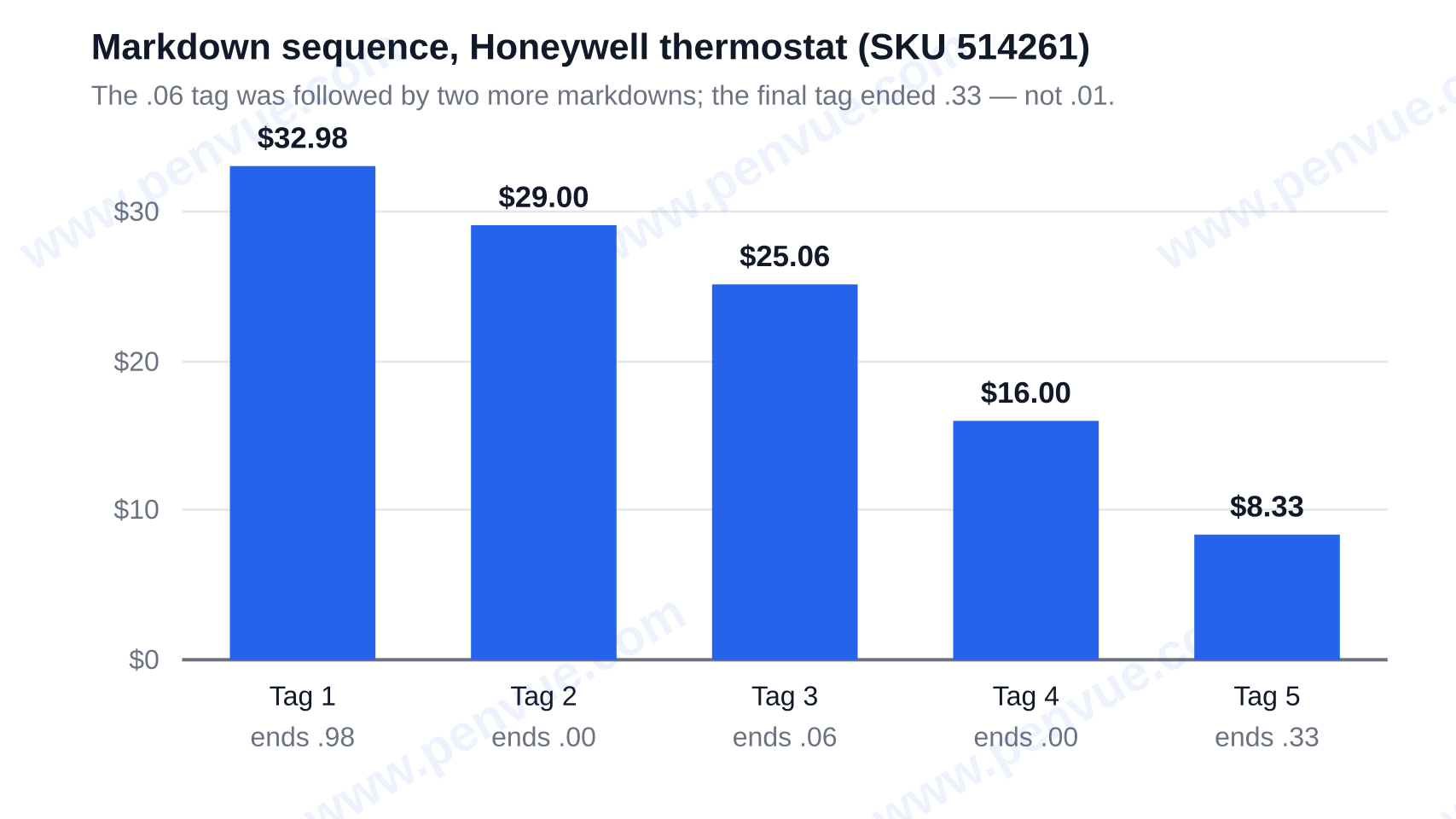
There is a checkable sequence that breaks the countdown reading outright. PennyCentral documents a Honeywell thermostat (SKU 514261) running $32.98 → $29.00 → $25.06 → $16.00 → $8.33. The .06 tag was followed by two more markdowns, and the final tag ended in .33, not .03, .02, or .01.
What an odd price ending actually tells you
The structural reason the decoders drift is simple: Home Depot publishes no chart guaranteeing what any ending means or when the next markdown will happen, which Scavenger also confirms. Each circulating version is shopper reverse-engineering, not policy.
The rule that survives all three is the “weird ending” rule: an odd ending is a prompt to scan the package UPC right now. It is not a calendar, it is not a “depth” discount, and it is not a reason to leave the item and come back next week.
How to find penny items at Home Depot, step by step
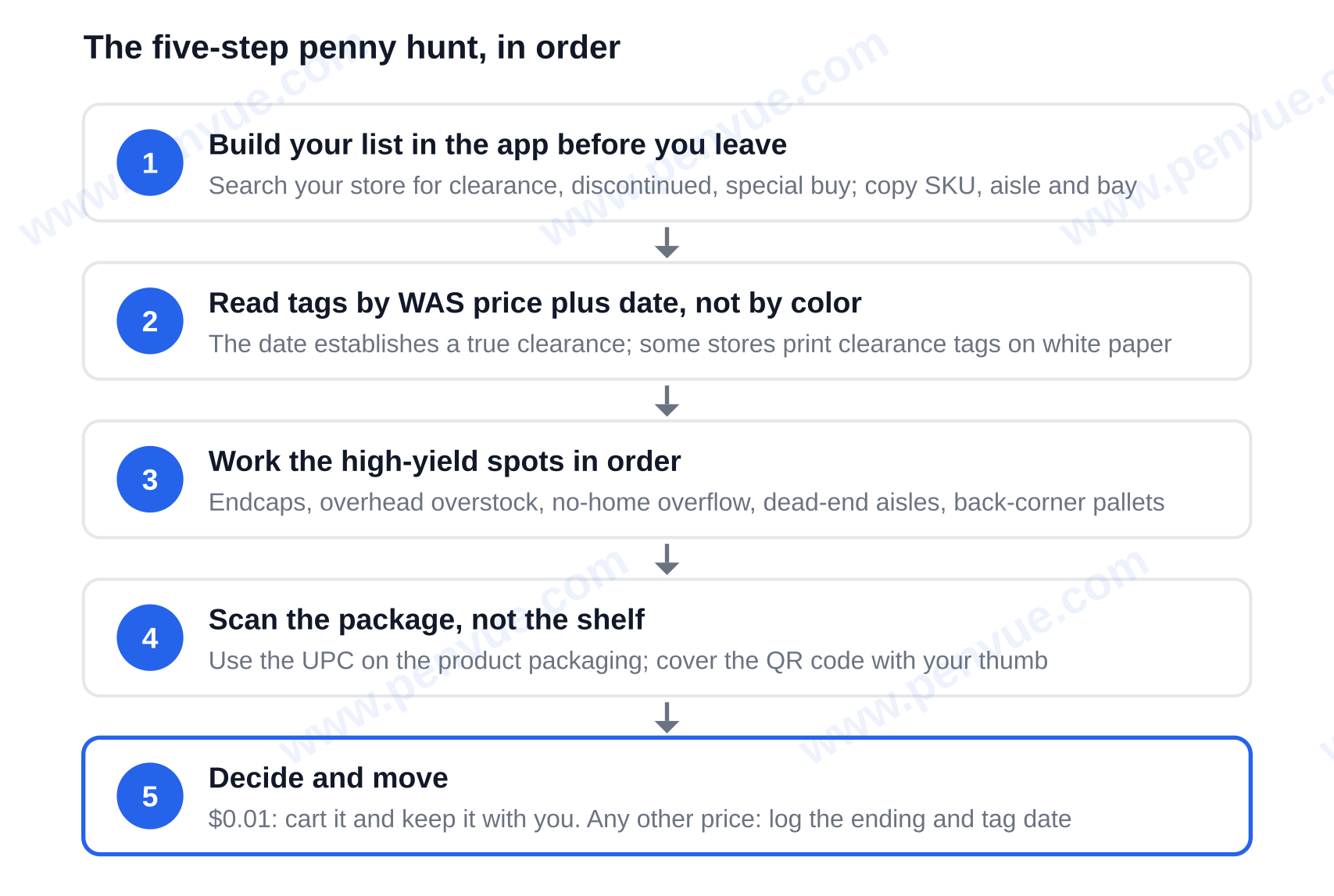
- Build your list in the app before you leave. Search your local store for “clearance”, “discontinued”, and “special buy” and copy down the SKU with aisle and bay.
- Read the tags by the WAS-plus-date combination, not the color. A real clearance tag carries both a WAS price and a date. The date is what establishes a true clearance — a yellow label with neither is just a standard label, and some stores print clearance tags on white paper.
- Work the high-yield spots in order. Start with the center aisle endcaps mid-store, then overhead shelves and overstock bays, then the ‘no home’ overflow area where unassigned stock is parked, then dead-end aisles, then the Damaged Packaging, Open Box and clearance pallet zones in the back corners, then behind bulky goods like toilets, bathtubs and tile pallets.
- Scan the package, not the shelf. Check the UPC barcode printed on the product packaging, never the barcode on the yellow shelf tag, and cover the QR code with your thumb so the scanner doesn’t read that instead.
- Decide and move. If it scans for $0.01, add it to your cart and keep it with you. If it scans for anything else, log the ending and tag date and move on.
How to check the scan actually worked
Before you go to the register, scan the same package UPC once more and confirm that the price is $0.01 and not a rounded or cached price. A printed shelf tag cannot confirm $0.01; only the store’s current system price counts. If the two scans do not agree, trust neither and treat the item as unconfirmed.
Where are penny items hiding, and which departments produce the most?
The departments hunters mention most consistently are Plumbing (a mix of small and large items), Electrical, Garden and Outdoor, and Paint. The common theme is a large number of stock keeping units (SKUs) paired with light staffing, which is what lets a missed pull survive.
Learn the logic instead of memorizing the list. Anything that has no assigned home, or sits above eye level and is awkward to move, is a spot where a markdown pull quietly fails. That is the real map, and it is half of how to find penny items at Home Depot.
Best time of day and time of year to hunt
Go between 7 and 9 a.m. on weekdays, or at opening on Sundays, before the overnight restock is worked out onto the sales floor. Seasonally, shop the weeks following the major holidays and during seasonal transitions, when discontinued and end-of-season stock hits final markdown. Vanities, hedge trimmers, deadbolts, power tools, fire pits, faucets, smoke detectors, and tile all turn up in hunters’ finds — read that as a pattern of what gets abandoned, not as a shopping list.
Why does the Home Depot app show a different price or stock count than the shelf?
Because the app is a consumer-facing view, not the register. PennyCentral describes a “Minus One” effect where the app commonly shows one less unit than the internal count associates see — so a zero count on the app can mean that unit is actually somewhere in the building.
The gap can be far larger than one. On one documented tile SKU (1006-993-602), the system showed 5.71 cases and the overhead pallet actually had a QTY of 32 — roughly 5.6 times the system count. That is the part the top guides miss: a low or zero count in the app is not a reason to skip the store, because the overhead is exactly where missed items accumulate.
Use the app for what it is genuinely good at: finding discontinued items, clearance SKUs, aisle and bay numbers, and scanning barcodes in-store. Do not rely on it for stock or price.
The one mistake that costs people the find
Explaining yourself at the register before the receipt prints is the biggest mistake, and the mainstream how-tos actively teach it.
Here is the mechanism they leave out. A self-identified Home Depot employee, quoted via The Mary Sue, describes the standard procedure as confiscating penny items directly out of a customer’s hands as long as no receipt has printed, on the grounds that the store contractually cannot sell them. The receipt is the dividing line. Complete the transaction first, then ask anyone anything.
Self-checkout avoids the conversation entirely, which is why hunters prefer it — though some registers are programmed to stop and call for assistance when a $0.01 item scans, so be ready for an associate either way. If staff do intervene, keep it brief and factual: the system rang it at a cent. If the store declines, the store declines.
On policy itself, be up-front that the sources disagree. As of May 2026, PennyCentral’s position is that penny items reaching a point of sale should be sold. PennyLoot, in a page dated October 29, 2026, says Home Depot has published no penny policy, markdown schedule or rules for handling a $0.01 scan at all. Both agree training and enforcement differ store to store, and Home Depot has issued no official statement — which is precisely why outcomes vary by store and even by shift.
Who should skip this method, and how do penny hunters find each other?
Two groups should not use this method. Home Depot employees reportedly cannot buy penny items at all — on or off the clock, or for family and friends — and must wait 24 hours before buying regular clearance, so asking a worker to grab one for you risks their job and gets you nothing. The second group is anyone holding what is really a stop-sale scan rather than a missed markdown: those items must never be sold, so the self-checkout method simply does not apply.
Penny lists and communities are real and active as of late 2026. Facebook groups, Discord servers, third-party scanner tools, dated member finds published with receipts and Endless.page (which published a Home Depot penny list in October 2026) all exist, and any claim that no lists exist is out of date. Just be clear-eyed about the paid tools: scanner and membership services sell probability and radius coverage, not access. The store can still decline the sale.
Can you return a penny item?
Think of it as final. A penny item is a deleted SKU, so plan to keep what you buy rather than count on a refund. The etiquette that keeps the hunt alive is the same shape: don’t shelf-clear, don’t harass or film employees, don’t broadcast live SKUs and store locations, and accept that most trips will yield nothing.
What to do next
Penny hunting is not a secret code — it is a procedure. How to find penny items at Home Depot comes down to five habits: read yellow tags for a WAS price and a date, work endcaps and overhead stock early in the morning, scan the UPC on the package rather than the shelf tag, ignore price-ending decoders as calendars, and finish your transaction before starting a conversation. The next step is to open the Home Depot app, search your local store for “clearance” and “discontinued,” write down the aisle and bay numbers, and go scan them in person. You’ll find related pieces under Lifestyle.